Atuin got even better!
Two years ago, my last post before this blog went offline was "use atuin and browse your shell history", a short introduction to this fantastic tool. Now I'd like to talk about the new features introduced in recent versions and what has improved since that first post.
 Giuliano Cardoso · · 2 min read
Two years ago, my last post before this blog went offline was "use atuin and browse your shell history", a short introduction to this fantastic tool.
Now I'd like to talk about the new features introduced in recent versions and what has improved since that first post.
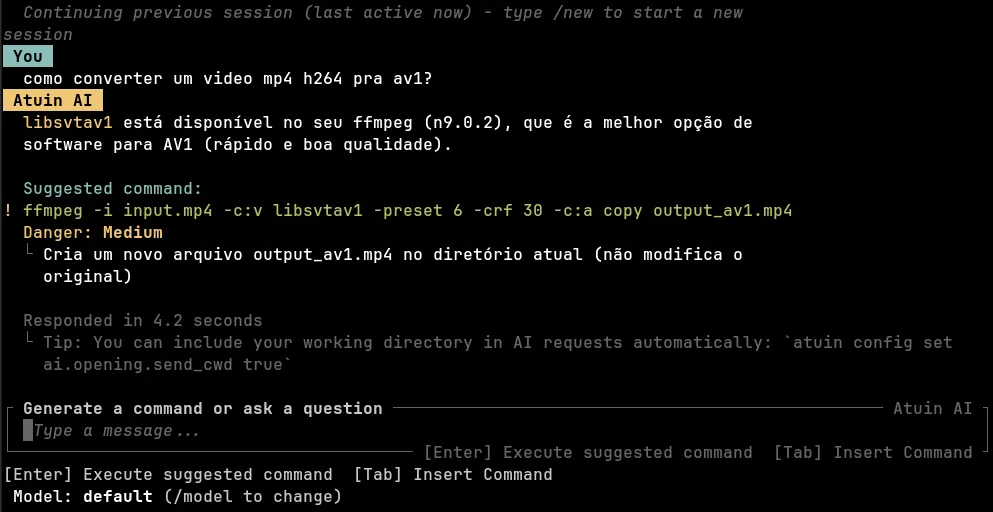
I believe the most interesting feature is that atuin now integrates an AI, which turns out to be a real lifesaver for solving everyday Linux hiccups without leaving the shell.
For example, if you don't know a command's syntax, or even the right utility to solve a problem, you no longer need to go to Google, turn to ChatGPT or Gemini, and/or dig through man pages to figure out how to solve it.
Just press SHIFT + ? right from the shell and the query box below opens:

And it goes further: you can ask which command to use, and the AI will tell you and even ask whether you want to run it.
And like any good salesman, I'll add: BUT WAIT, THERE'S MORE!
Atuin can be configured to record not only the commands you ran with their arguments, but also the full shell output, that is, what the programs printed. That way it can diagnose why a previously run command didn't work as expected, saving you time on troubleshooting and sparing you from copying and pasting the output and commands into an AI assistant.
More details on how to do this can be found in the extensive, excellent documentation here.
And if you worry about sharing your data with an AI when you don't know where it ends up or with whom, note that atuin supports integration with ollama, as we can see here.
So there is no reason not to use this tool, which keeps getting better every day.